Internal notes your client never sees (in the same thread)
Every client-facing team runs two conversations at once: the one with the client, and the one about the client. Keeping them in separate tools is how "did you see my Slack about the Lumen thread?" becomes a daily sentence — and how, one terrible day, the internal comment lands in the client channel.
Same thread, two layers
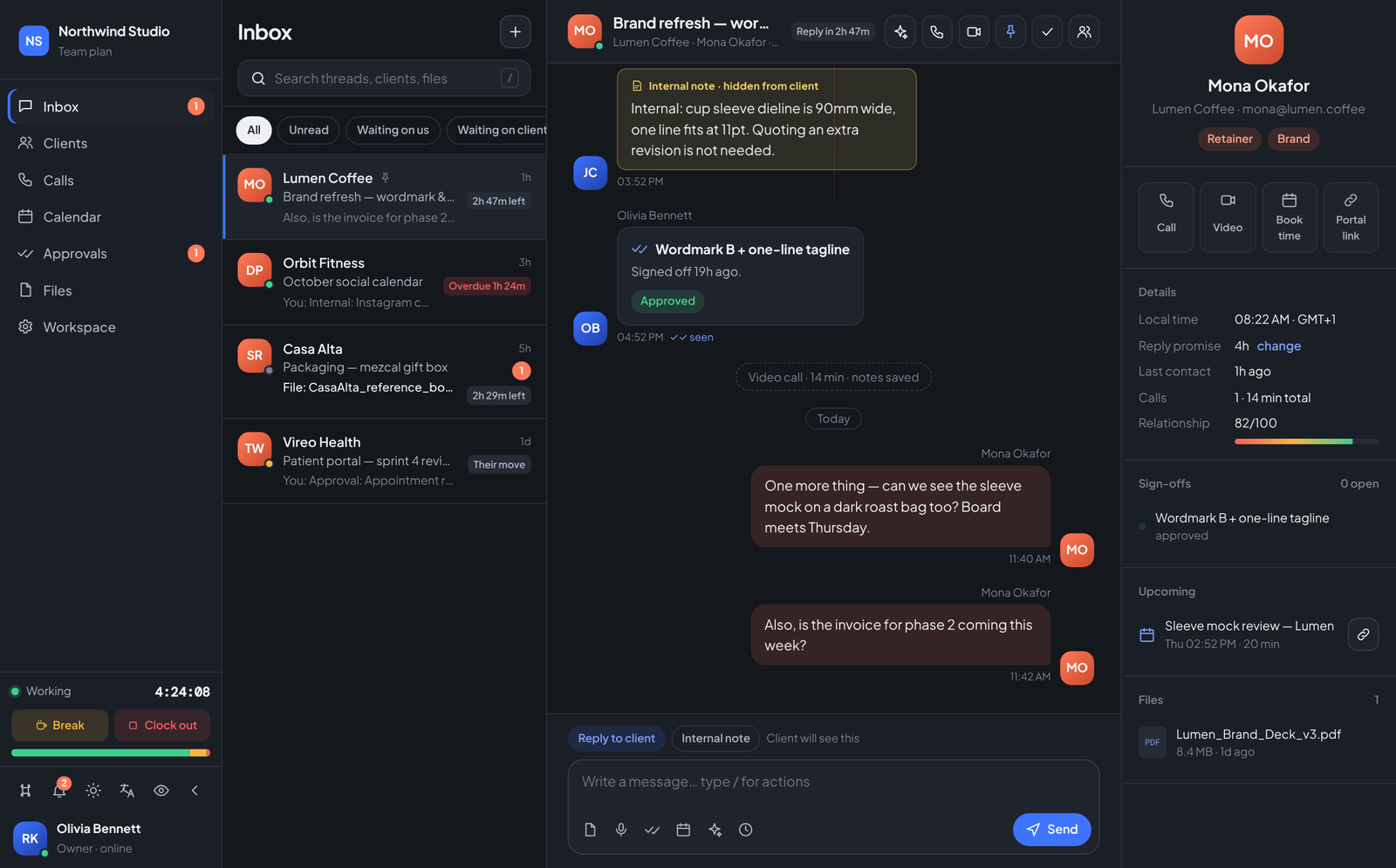
In Teamdott the composer has two modes: Reply to client and Internal note. Notes render in amber with an explicit "hidden from client" label, inline at the exact point in the conversation they refer to. The client's portal view simply does not contain them.
Why inline beats a side channel
- Context stays attached. The note about the dieline width lives next to the dieline conversation — not in a chat scroll three tools away.
- Handovers become trivial. A teammate covering your holiday reads one thread and sees both layers: what was said, and what the team actually thinks.
- The nightmare is structural, not behavioural. You cannot paste an internal note to the client by accident, because notes are a message type, not a copy of text in the wrong box. The mode you are typing in is labelled above the composer.
Internal notes are one layer of the one-thread-per-client model — the same thread also carries approvals and reply promises.
Run your team on Teamdott
Clock in/out, live availability, timesheets, leave, payroll and branded payslips — plus one thread per client. The workspace preview is open: no card, no setup call.